
LIVE PRODUCTION
Stay focused on the game.
Sport-specific score and clock controls, configurable scoreboards and a browser Player. Run the Controller from your phone, tablet or computer; share the same game with your crew.
ZingCue · Every Spot. On Cue.
Score the game. Track the stats. Coordinate your crew. Power your graphics. Automate your sponsors. Engage your fans.
Keep the game, your crew and sponsor cues together—and show sponsors what actually ran.
Works with the production equipment you already own.
14 days free · No credit card required

From the broadcast booth
After nearly a decade broadcasting high school sports, Chris Welch knew how much one crew has to juggle: the score, the clock, the next sponsor spot—and remembering what actually ran.
ZingCue grew out of that Friday-night problem. It brings scoring, sponsor cues and placement reports together, so broadcasters can spend less time managing the moving parts and more time covering the game.
Built around your broadcast
LIVE PRODUCTION
Sport-specific score and clock controls, configurable scoreboards and a browser Player. Run the Controller from your phone, tablet or computer; share the same game with your crew.
TEAM COMMUNICATIONS
Invite camera operators with a link or QR code—no accounts needed. Send quick messages with acknowledgments, chat two-way, and hold a button to push-to-talk with the Controller, one camera or everyone. Voice stays on crew phones and the Controller, never on your stream.
FAN ENGAGEMENT
Turn on the Live Game Center and share a link or QR code. Fans follow the live score, clock, ball position, team stats and recent plays on their phones—free for viewers, no sign-in, and it never counts against your productions.
SPONSOR ACTIVATION
Associate media with sponsors, trigger graphics and video, and attach audio to game moments. SmartBreak assembles commercial lineups from eligible sponsor inventory for your configured break windows.
SPONSOR INTELLIGENCE
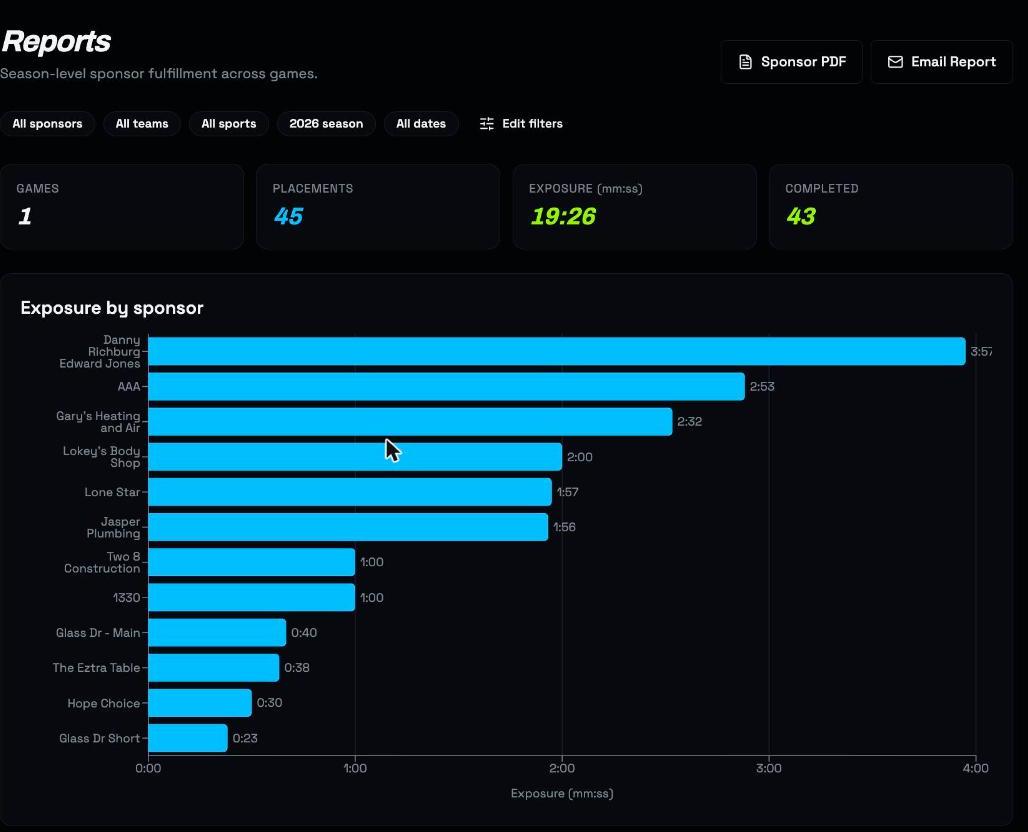
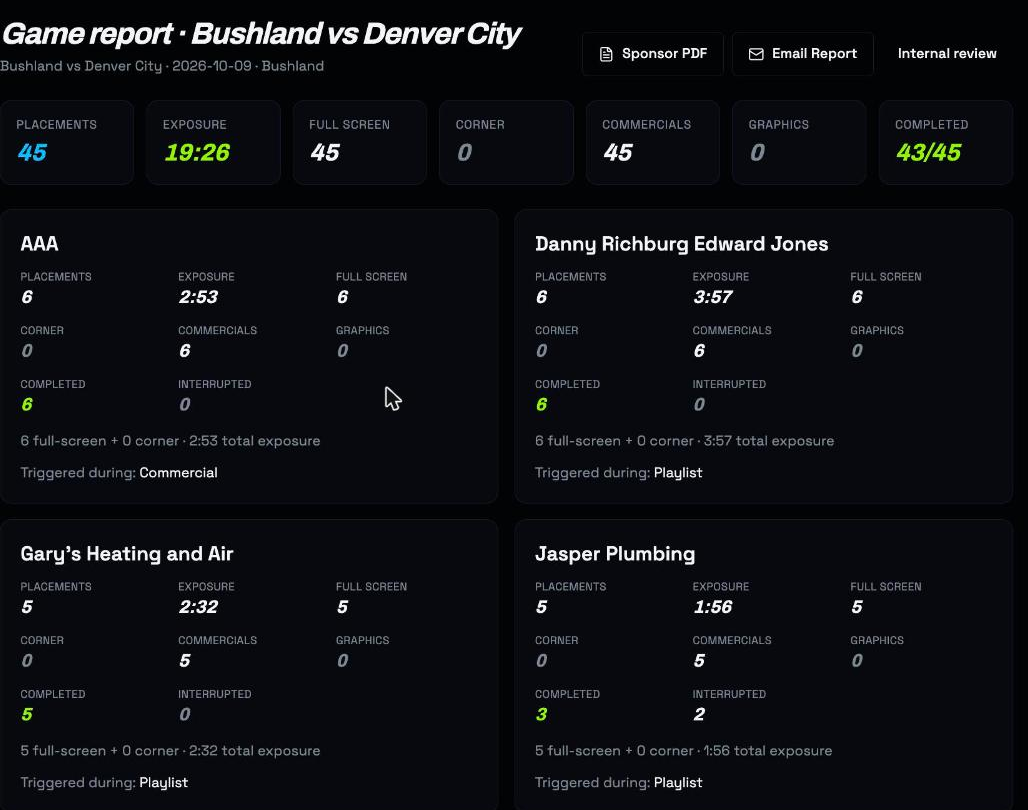
Track sponsor fulfillment and screen exposure, with completed and interrupted plays in your reports. Give advertisers a clear record of their sports advertising placements—not a guess.
NETWORK MANAGEMENT
Authorized network administrators can manage child organizations, share sponsor assignments and consolidate reports. Contact sales to arrange network access and the concurrent live production capacity you need.
Real product. Real evidence.
Review recorded placements, exposure and interrupted plays. Give your sponsors a report they can use.
SmartLoop connects your halftime sponsor reel with Game Stats, scoring-drive summaries and matchup graphics. SmartBreak handles your prepared commercial windows; fulfillment reports keep a record of what actually played.
See the real product
From the first whistle to the final sponsor report, ZingCue keeps your broadcast on cue.
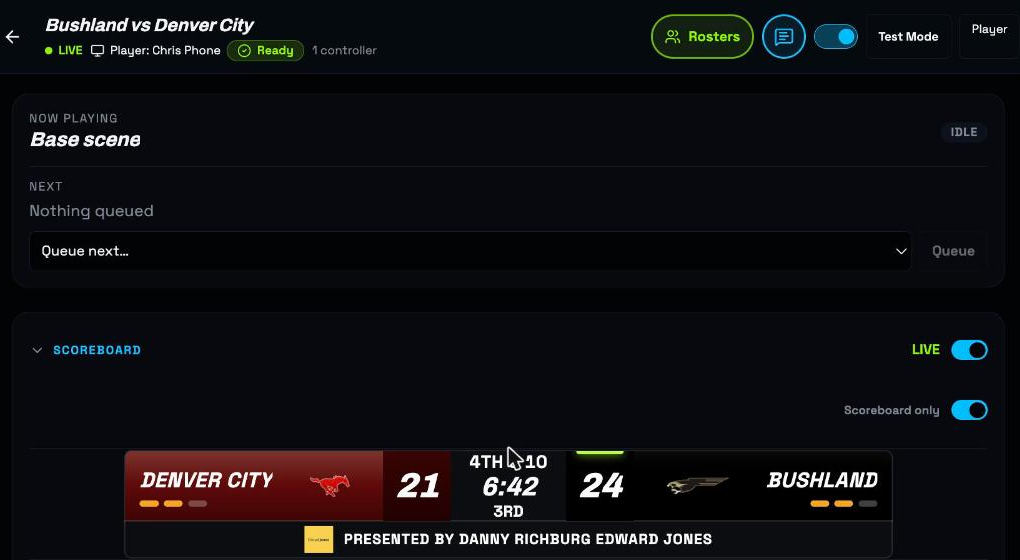
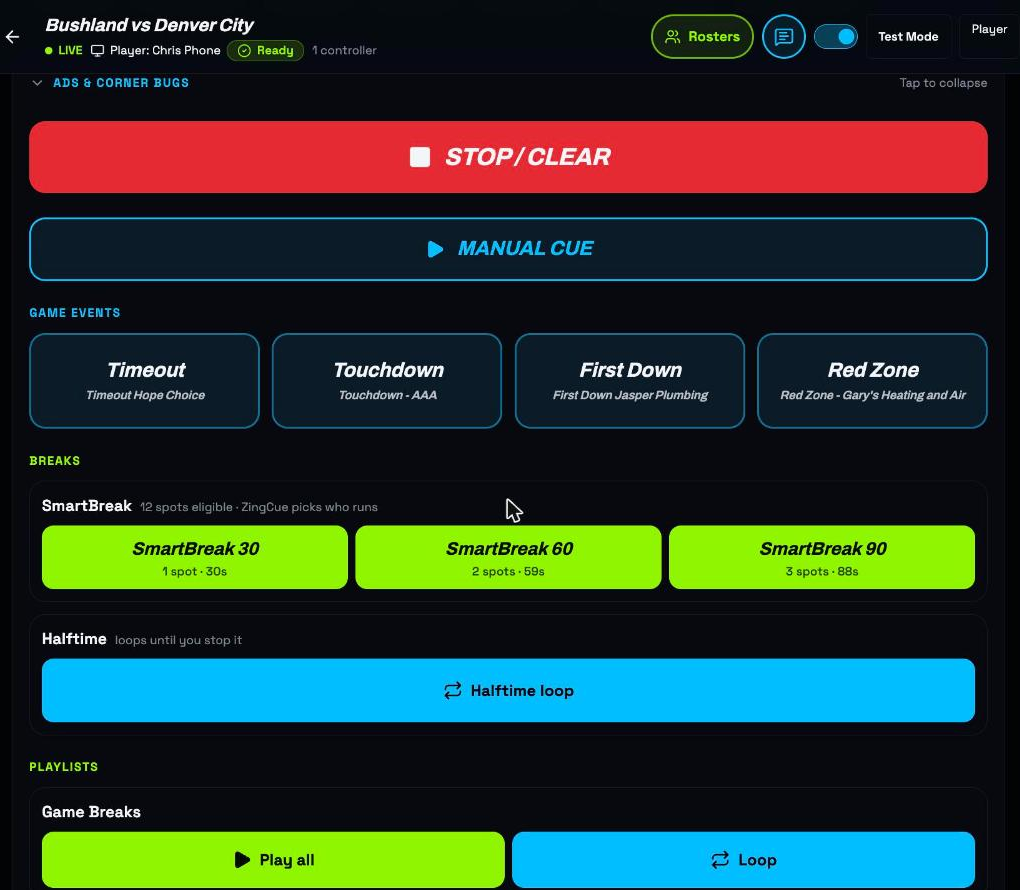
Real product screenshots. Book a live walkthrough to see scoring, sponsor audio, commercial breaks and reporting together.
Seven supported sports
From Friday night football to spring baseball, ZingCue helps you deliver professional broadcasts throughout the school year.
The ZingCue platform
Six powerful capabilities. One connected game-day experience.
Live scoring, detailed statistics, play-by-play, game history, and scoring-drive analysis.
Dynamic scoreboards, game statistics, matchup graphics, and automated overlays.
Live Controller, production workflows, SmartLoop, and automated content presentation.
Real-time crew messaging and voice communication to keep everyone coordinated.
Advertising campaigns, automated sponsor rotation, fulfillment tracking, and proof of delivery.
Live Game Center, interactive game information, QR access, and second-screen experiences.
From the first play to the final whistle, ZingCue keeps your game, crew, sponsors, and fans connected.
ZingCue complements the production equipment and software you already use. Keep your cameras, switchers, and streaming workflows while adding the game intelligence, crew coordination, graphics, automation, and fan engagement that make every production better.
Browser output for OBS, vMix and supported YoloBox web overlays. Your switcher stays in charge.
A simpler start
Getting started shouldn't require a production engineer. Ask Zing guides you through setting up sponsors, uploading media, and creating your first game, so you can spend less time configuring software and more time producing great broadcasts.
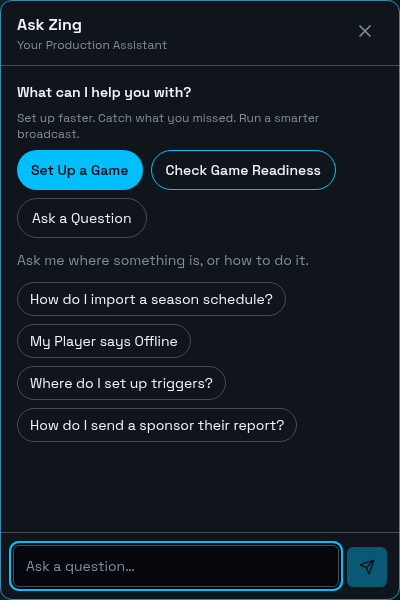
You pair the Player, finalize your scoreboard, configure your triggers and press Go Live yourself. Ask Zing helps you prepare—it does not run the broadcast for you.
Pricing
Start with a single broadcast organization. Talk to us when your coverage needs more teams, venues or simultaneous games.
INTRODUCTORY OFFER
$49/month
or $499/year
One broadcast organization. Every supported sport. Your introductory rate stays locked while your subscription stays active.
Contact Sales
For athletic departments, student crews and district-wide coverage.
Contact Sales
For organizations coordinating broadcasts across teams and venues.
Starter is designed for one live production at a time, with a second slot for back-to-back game overlap—not a multi-venue plan. For regular simultaneous games, contact sales. Network licensing is arranged with us, not through online checkout.
14-day free trial. No credit card required.
Before game day
ZingCue supplies a browser Player output, not a switcher integration. Add it as an OBS browser source, vMix Web Browser input or supported YoloBox web overlay. YoloBox Ultra and Extreme route web-overlay audio into their mixer; older Pro models may need a separate audio connection. Check your model and audio settings before game day.
No dedicated ZingCue hardware is required. Use a browser on your existing computer for the Player and a phone, tablet or computer for the Controller, plus your normal production equipment and reliable internet.
No. Keep camera switching, streaming and recording in your existing production system. ZingCue adds scoreboards, sponsor playout and fulfillment reporting alongside it.
Students and staff can share game controls through organization team access. Set appropriate roles and practice in Test Mode before the broadcast; test plays do not credit real sponsor fulfillment or advance the real sponsor rotation.
Football, basketball, volleyball, baseball, softball, soccer and field hockey have supported scoreboards and sport-specific controls. Choose a configurable layout and your team names, colors and logos.
Starter is designed for one live production at a time, with a second slot for back-to-back game overlap. Multiple operators on one game do not mean multiple productions. For regular simultaneous games or multiple venues, contact sales about custom capacity.
Reports show recorded sponsor placements and exposure, including completed and interrupted plays. Review per-game and season evidence, then export, print or email reports. Companion trigger audio is not counted as a separate sponsor impression.
Network administration supports child organizations, shared sponsor assignments and consolidated reporting for authorized network members. Contact sales to plan access and simultaneous production capacity; paid network activation is not a self-service checkout option.
Start with 14 days free, with no credit card required. Create sponsors, upload media and try your game workflow. When the trial ends, choose a paid plan to continue using the app.
Ask Zing guides sponsor setup, media uploads and game creation, with confirmation before saving. Progress is saved and Finish Later lets you explore the dashboard and resume. You still pair the Player, finalize your scoreboard, configure triggers and press Go Live yourself. You can also book a 15-minute demo.